

METROTEX Members Get tether re
as a sponsored MEMBER BENEFIT
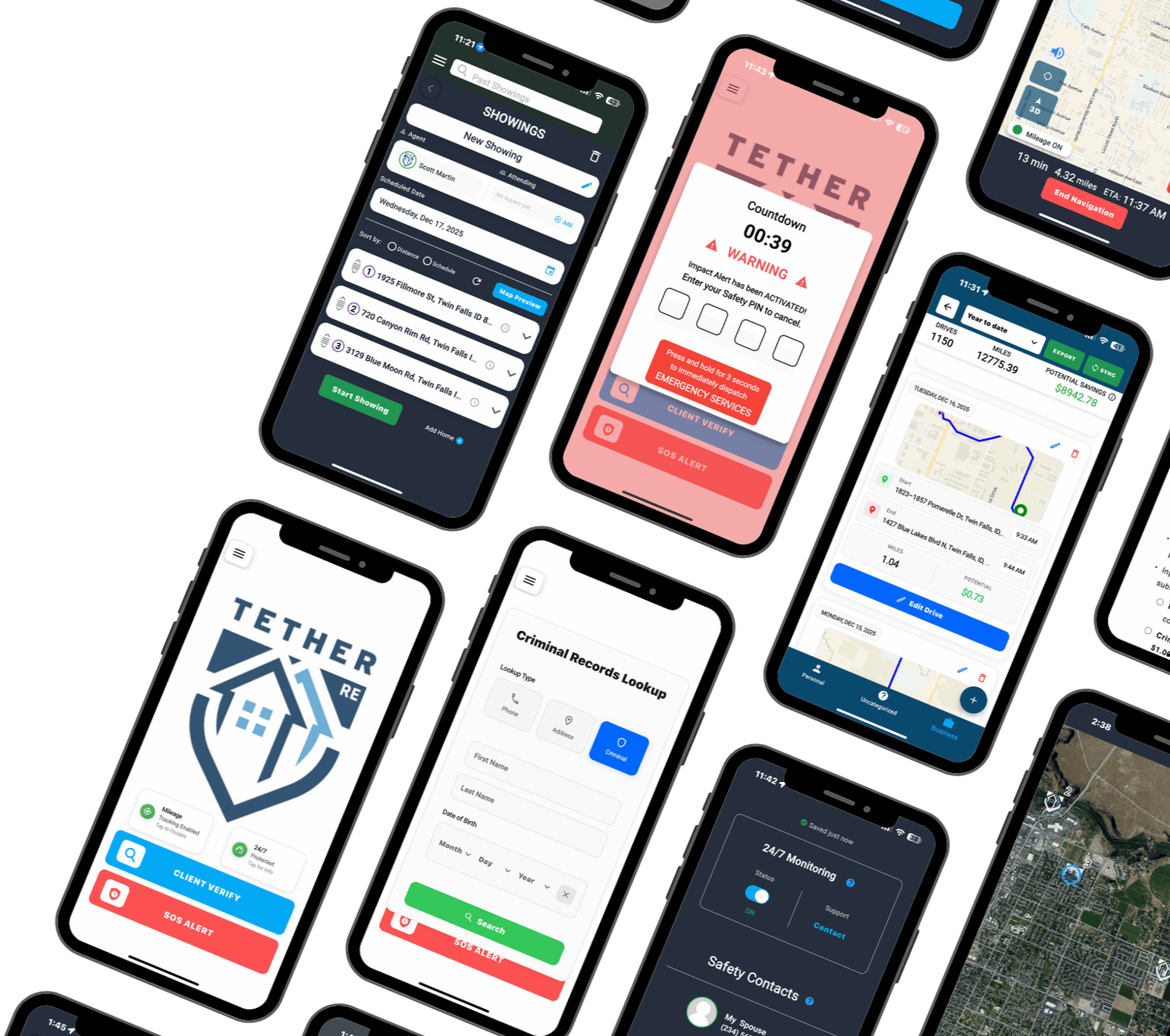
Tether RE is a personal safety platform built specifically for real estate professionals. It protects agents at every stage of the transaction—from first contact to final close—with powerful safety and productivity features.
Protection & Peace of Mind.
From contact to close.

Tether RE is a personal safety platform built specifically for real estate professionals. It offers 24/7 live safety monitoring, SOS alerts, struggle detection, proximity timers, and verified client screening tools and background checks—all designed to protect agents from the moment they make contact with a client to the close of a deal.
With Tether RE, agents are never truly alone. Because the most important part of any deal, is making it home safe.
24-hour life monitoring
Agents monitor in real time and dispatch EMS if an emergency is detected, even if the agent is unable to speak or manually call for help.

sos alerts
Tap the panic button to discreetly notify your emergency contacts and Tether Monitoring in any situation that feels unsafe.

real-time gps tracking
Dispatchers and safety contacts always know where you are, ensuring help can reach you fast, wherever you are.

struggle detection
Automatically senses sudden impact or struggle (e.g., falls, assaults, car crashes) and initiates safety protocols.

client verification
Reverse phone and address lookups, and criminal background checks. Tools designed to reduce risk and provide peace of mind.

productivity tools
Come for the safety, stay for the productivity. Best-in-class mileage and expense tracker, showing tools, buyer notes, and showing logs.
DISCOVER WHY AGENTS LOVE US
-
![]()
We finally found the perfect partner in Tether RE. Smart enough to detect a struggle and sticky enough to be used daily. Brilliant!!!
Matt Kuchar
Showami -
![]()
The two Q’s of safety are quick and quiet. Tether RE figured that out and put everything you need to get home safe in one place.
Raymond Joseph
West Virginia Association of Realtors -
![]()
As someone who has been in the real estate industry for 30+ years, I can tell you Tether RE is a game-changer for Realtor safety.
Kyle Hunter
Lone Wolf Technologies -
![]()
I'm going to tell everyone about you guys! The safety features are huge. Thank you again and you all stay safe as well.
Teya Young
St. Paul (Minnesota) Association of Realtors -
![]()
I’m so glad I had access to Tether RE. It gave me the clarity (and safety) I needed in a tough situation.
Michelle Wissman
Anne Arundel County (Maryland) Association of Realtors





🔷 24/7 Live Safety Monitoring
Get real-time support from trained safety agents who stay with you virtually during showings, open houses, client meetings, and beyond.
🔷 Verified Client Screening & Background Checks
Instantly screen phone numbers, property addresses, and run criminal history checks before meeting new clients.
🔷 SOS Alerts
Discreetly trigger an emergency alert to your chosen contacts and Tether’s 24/7 Safety Monitoring with a single tap.
🔷 Proximity Safety Timers
Safety timers notify your contacts and our monitoring center if you don’t leave a property on time, sending help when needed.
🔷 Struggle & Impact Detection
Tether RE uses smart motion detection to identify physical struggle or sudden impact and trigger emergency alerts—even if you can’t.
🔷 Mileage Tracking
Automatically logs your mileage when using Tether RE. Easily categorize trips as business or personal, and export reports for tax season.
🔷 Custom Branding for Brokerages
Add your brokerage’s logo and brand identity across the platform for a professional, unified experience.
🔷 Web Dashboard Access
Manage safety settings, download mileage reports, and view client verification results from your desktop.
🔷 …and MORE!
Explore our Tutorial Library to see all the powerful features Tether RE has to offer.

Tether RE offers 24/7 live safETy monitoring for real estate professionals.
Tether RE is the only safety platform built for real estate professionals that offers true 24/7 live safety monitoring—because agents deserve protection that never clocks out.
come for the safety…
stay for the productivity.
Safety is our priority—but agents love that Tether RE also includes a best-in-class mileage tracker with every subscription. Use it daily, save money yearly, and know your safety tools are always running in the background.
Plus, enjoy other productivity features like showing tools, expense tracking, and buyer tools—all in one app.


Client Verify: Know before you go.
Tether RE’s Client Verify tools help protect agents—and the organizations that support them—by giving real estate professionals the power to screen potential clients before face-to-face meetings.
✔ Reverse phone number lookups
✔ Reverse address lookups
✔ Criminal background checks
Tether RE prides itself on offering these features with protections designed to reduce risk, prevent consent-related violations, and provide peace of mind.
Want to learn more about how we’re working to protect your team?

Frequently Asked Questions
-
MetroTex sponsors Tether RE to its members. You don’t have to pay for the monthly signature, only for the lookups.
-
Lookups are pay-per-use.
Reverse Phone Lookup:
$0.25 per look upReverse Address Lookup:
$0.25 per look upCriminal Background Check:
$1.00 per background check
-
To activate you MetroTex-sponsored Tether RE membership, access http://portal.tetherre.com/select-organization?org=metrotex and create your account.
-
Creating an account is required to access and use the platform's features. Access TetherRE.com/onboarding for step-by-step instructions.
-
TetherRE is compatible with both iOS and Android devices.
-
Check your phone's settings: search for Tether in the app settings and verify that both Location and Contact Permissions are enabled. If the issue persists, please contact suport@TetherRE.com for further assistance.